
Fortnite Cheat Configs for Build Mode and Zero Build: Why One Does Not Fit Both
The same config that carries you in Zero Build will get you killed in a box fight. This explains the two profiles properly: aim behaviour, radar radius, item filters and what to bind.
Most people set a cheat up once and never touch it again. Then they wonder why it feels perfect in Zero Build and useless in a box fight.
The reason is simple. Build mode and Zero Build are opposite problems. One is a close range geometry fight where the enemy keeps swapping planes behind fresh builds. The other is an open field with no cover, decided almost entirely by who sees who first.
One config cannot serve both. Two can.
Why the aimbot has to be different
In build mode, fights happen inside ten metres, often in a single box. The enemy peeks, edits, and moves between planes constantly. A wide capture radius does not help there, because the crosshair keeps grabbing walls, ramps and other people's builds instead of the target.
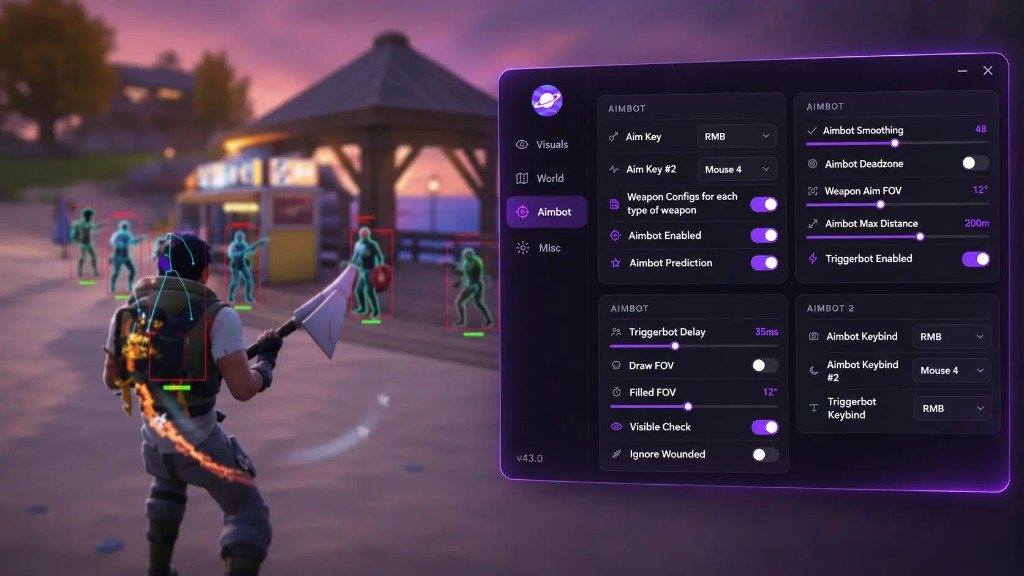
Build mode aim settings:
- FOV: 3 to 6 degrees. Narrow enough that the crosshair only engages what you are already pointing at.
- Smoothing: moderate to high. Fast snaps look mechanical in a box and fight against your own edits.
- Hitbox: head, with neck as a fallback if you whiff on small targets.
- Max distance: low. Anything past 60 metres in a box fight is not your problem.
- Visible check: on. There is no point locking through a wall you are about to edit anyway.
- Ignore wounded: on. Knocked players eat your crosshair in stacked fights.
Zero Build aim settings:
- FOV: 8 to 12 degrees. Slightly wider is fine because there are fewer surfaces to snag.
- Smoothing: lower. Trades are longer and you need the crosshair to arrive.
- Hitbox: chest, moving to head for anything scoped.
- Max distance: high, so long range trades are covered.
- Prediction: on and tuned up. Players rotate in the open and you are leading moving targets.
- Visible check: on, but expect it to matter less because so much of the mode is open ground.
Triggerbot
The triggerbot is more useful in Zero Build than in build mode. At range, the difference between firing on the frame the crosshair crosses a hitbox and firing a beat later is the difference between a tag and a miss.
Keep delay low for long range work. In build fights, a low delay mostly gets you early shots on builds, so either raise the delay or bind the triggerbot to a separate key and use it only when you are actually tracking a body.
Radar radius
Radar is where the two modes diverge hardest, and it is not about preference.
Zero Build rotations happen across open ground between zones. A wide render radius and a large player size give you the early warning that the mode depends on. Off screen arrows matter more here than in any other context, because squads converge from multiple directions in the final circles and you get no cover to react from.
Build mode wants the opposite. Narrow the radius to the close circle. A wide radar is noise when the next fight is two walls away, and the player markers overlap into a smear at that distance.
Concretely: wide radius, high player size and background alpha near opaque for Zero Build. Narrow radius, small markers, lighter background for builds. Set orientation lock to whatever your minimap reading habit is and leave it alone; switching between modes is confusing enough without the radar flipping too.
Item ESP
Both modes want filters, for different reasons.
Build mode: materials and heals only. You are not looting mid fight and every rarity tier on screen is clutter.
Zero Build: weapons by rarity plus heals and shields, with max distance capped. Exotic and legendary only if you actually push for them; otherwise you are highlighting half the island.
Turn amount and distance readouts on. Turn rarity text off if the markers get busy. The colour should contrast against sand and grass, which rules out anything close to yellow or pale green.
ESP readability
Separate visible and hidden colours sharply. The point of the hidden colour is that you can tell at a glance whether a target has line of sight on you, and that only works if the two are unmistakable.
Skeleton style is a personal call, but sharp reads better in build fights where bodies are partly behind builds. Bezier is smoother and easier on the eye at range.
Turn NPC and bot filters on for both. Bots are common in low ranks and they flood the overlay with markers that mean nothing.
Bindings and the panic key
Bind the aimbot to a mouse button you can hold through a fight without tension. Two aim binds are useful: one for close range, one for distance, each pointing at the config for that mode.
Bind the battlemode toggle somewhere reachable and learn it. Toggling the whole overlay off when you need a clean screen is faster than unticking boxes mid match.
Switching cleanly
Two saved configs, named for the mode, is the whole system. Load the right one in the lobby before you queue.
Do not rebuild settings inside a match. Menu work during a fight costs you more than the settings gain.
If you play both modes in one session, keep the load step boring and identical: lobby, load config, check two or three values, queue. It takes ten seconds and stops you carrying a narrow box fight FOV into an open field.
Start from a baseline
The Fortnite cheat ships with per weapon configs, four hitbox options, adjustable FOV, smoothing, deadzone, max distance, two aim keybinds and full radar and item controls, so both profiles are buildable without compromise. The Fortnite cheat page lists the full set, and aimbot settings for box fights goes deeper on smoothing and FOV than this piece needs to.
Build the Zero Build config first. It is the more forgiving of the two, and it teaches you what each slider does before you tighten everything down for a box fight.